|
|
Archive for the ‘Messaging’ Category
Tuesday, October 21st, 2014
 I was quite thrilled when I heard that our customer Wegmans got ranked by Consumer Reports as the #1 supermarket chain in the US. I was quite thrilled when I heard that our customer Wegmans got ranked by Consumer Reports as the #1 supermarket chain in the US.
Wegmans have been long-time customers of NServiceBus and I recently got the opportunity to go on a guided tour in their flagship store in Rochester and hear all the ways that they’ve been leveraging our platform – even the scales that people use to weigh their produce are linked up.
Yup – you may even be eating NServiceBus and not know it 🙂
There are also some pretty powerful back-office processes at play – things that your regular consumer wouldn’t even notice but that matter quite a bit.
In any case, I’ll hand this over to Adam Fyles – the person who has done the actual work of getting NServiceBus into Wegmans, from the early proof-of-concept days to leveraging it across the enterprise to tell the story himself.
Here’s Adam presenting at NSBCon USA 2014:
And if you want the slides or to hear more from Adam, check out his blog at: http://adamfyles.blogspot.com/.
For more information on NServiceBus and the rest of the Particular Service Platform, check out http://particular.net/
Posted in Community, Messaging, NSBcon, NServiceBus, Presentations, Pub/Sub | No Comments »
Monday, May 26th, 2014
 In one of Uncle Bob’s recent blog posts on the Single Responsibility Principle he uses the example of using people and organization boundaries as an indication of possible good software boundaries: In one of Uncle Bob’s recent blog posts on the Single Responsibility Principle he uses the example of using people and organization boundaries as an indication of possible good software boundaries:
When you write a software module, you want to make sure that when changes are requested, those changes can only originate from a single person, or rather, a single tightly coupled group of people representing a single narrowly defined business function. You want to isolate your modules from the complexities of the organization as a whole, and design your systems such that each module is responsible (responds to) the needs of just that one business function.
This is something that often comes up when I teach people about service boundaries when it comes to SOA – organization boundaries are the most intuitive choice.
And, once up on a time, that intuition might have indeed held up.
Stepping back in time
In the age before computers, organizations had a very specific way of structuring themselves.
People who had to work closely together sat in close physical proximity to each other. Data that was required on an ongoing basis would be in file cabinets also physically co-located with the people using that data, and it would be structured in a way that was optimal for their specific purposes. All of this was due to the high cost of communicating with people farther away.
If you needed data from a different department, you had requisition it by filling out a special form, put it in your outbox, and then some guy from the mail room would pick it up, and physically schlep it to the right department, putting it in their inbox, and then someone there would get your data for you – putting it together with your original request, and then the mail guy would schlep it back. This inbox/outbox style of communication should ring a bell from the messaging patterns I talk about with NServiceBus.
As a result, different departments had to have very clearly delineated responsibilities with minimal overlap with each other. The organization just couldn’t function any other way.
And then a bunch of us geeks came along.
Enter the age of computers and networks
By introducing this technology, the cost of communication across large distances started falling – slowly at first, and then quite dramatically.
When anyone in an organization was able access data from anywhere in the blink of an eye, an interesting dynamic started to unfold. All of a sudden, the division of responsibility between departments wasn’t as critical as it was before. When an employee needed to do something, there wasn’t this “that isn’t our job, you need to go to so-and-so” reaction. Because things could be done instantly, that’s exactly what happened.
And then came the politics
By removing the cost of communication, it became possible for more power-hungry people in the organization to start making (or trying to make) decisions that they couldn’t have made before. The introduction of computers into an organization was heralded as a new way of doing business – that the old organizational boundaries were a relic that we should leave behind us.
And thus can the re-org (the first of many).
Responsibilities and people were shuffled around, managers vied for more power, and politics took its’ place as one of the driving forces in the company structure.
Nowadays, if you want a decision made in a company, there isn’t just one person who has the authority to sign off on it anymore. No, you need to have meetings – and more meetings, with people you never knew existed in the company, or why on earth they should have a say on how something is supposed to get done. But that is now our reality: endlessly partially overlapping responsibilities across the organization.
So, what of the Single Responsibility Principle
This just makes it that much harder to decide how to structure our software – there is no map with nice clean borders. We need to be able to see past the organizational dysfunction around us, possibly looking for how the company might have worked 100 years ago if everything was done by paper. While this might be possible in domains that have been around that long (like banking, shipping, etc) but even there, given the networked world we now live in, things that used to be done entirely within a single company are now spread across many different entities taking part in transnational value networks.
In short – it’s freakin’ hard.
But it’s still important.
Just don’t buy too deeply into the idea that by getting the responsibilities of your software right, that you will somehow reduce the impact that all of that business dysfunction has on you as a software developer. Part of the maturation process for a company is cleaning up its’ business processes in parallel to cleaning up its’ software processes.
The good news is that you’ll always have a job 🙂
Posted in Agile, Architecture, Autonomous Services, Management, Messaging, OO, SOA | 2 Comments »
Tuesday, April 22nd, 2014
 Since my last post announcing NSBcon you probably haven’t gone to take a look at what’s happening. Since my last post announcing NSBcon you probably haven’t gone to take a look at what’s happening.
The speaker lineup for NSBcon London 2014 is now complete and we’ve got a really great mix of talks, if I do say so myself.
I’ve already mentioned that Oren and Greg will be there, but I wanted to talk a bit about the rest of the roster:
First up – Wonga
If you’re living in the UK, you almost can’t avoid seeing these ads.

What you probably didn’t know is that Wonga has been running on NServiceBus for years now.
(No – we had nothing to do with the ads, and there’s nothing we can do about them.)
Charlie Barker was there from the beginning and has lived to tell the tale:
We faced the problem of scaling our platform to meet rapid growth in customers whilst at the same time increasing the team from 15 to 200 people spread across five countries. We did this by transitioning from N-Tier to SOA even as we were delivering new features and keeping the platform stable. No small feat.
This is an interesting story to hear, not only from the point of view of NServiceBus, and I’d definitely recommend grabbing Charlie over lunch or over a beer. This is probably one of the higher profile startup successes in the UK you’ll find and, as always, the behind the scenes story is just fascinating.
And to the cloud!
No self-respecting technology conference these days can go without spending at least some time talking about the cloud – and we won’t be the ones to buck the trend, even though we have a healthy disrespect for all sorts of things, including the ourselves 🙂
You’ll hear from one of the foremost Azure MVPs and all around cloudy Belgian Yves Goeleven (whose last name nobody is really sure how to pronounce). Yves has been the driving force behind getting all the various bits of Azure infrastructure integrated into NServiceBus and, if you get him to just the right level of inebriation, will spill all the dirty little secrets of the Azure platform that Microsoft doesn’t want anyone to know.
Dylan Beattie will then relate his tales of creating loosely-coupled encoding workflows for audio and video on the cloud at Spotlight – one of the world’s leading resources for professional actors, casting directors, and production professionals. It ain’t easy making ordinary people into stars.
And so much more
To see the complete lineup, go to NSBcon.com.
And me – what will I be talking about? That’s a good question.
Not to steal my own thunder (after stealing everybody else’s), but you’ll hear about the deeper integration we’ve got planned for SignalR, making your event-driven architecture extend from the back of your systems all the way to the browser, so much simpler and smoother than you ever thought possible.
I’ll also tell you about how we’re going to enable you to run on queues that don’t support distributed transactions (like Service Bus for Windows Server) without having to worry about making your logic idempotent. For some background, see my blog post on Life without distributed transactions.
In short – it’s going to be a kick-ass conference.
Check it out.
* and for those of you paying out of pocket, contact nsbcon@particular.net for a discount.
Posted in Community, EDA, ESB, Messaging, MSMQ, NSBcon, NServiceBus, Workflow | 4 Comments »
Wednesday, April 16th, 2014
 After many months of hinting about the coming of the Particular Service Platform, it’s finally here. After many months of hinting about the coming of the Particular Service Platform, it’s finally here.
For everybody who has been building message-driven systems on .NET – I really do believe that this is the dawn of a new era (and if you know anything at all about me, you know that I don’t tend to exaggerate).
What is it?
Imagine designing your solution by graphically creating endpoints and messages, seeing the routing laid out in front of you visually, being able to specify system wide error and audit queues, having your cross-cutting authentication applied automatically to all endpoints, correlating events together into sagas, pressing F5, and as everything springs to life, on your second monitor you can see the messages flowing through your specific debug session synchronized in real time as you step through your code.
Well, you don’t have to imagine – that’s now a reality.
Top that off with some nice production monitoring that includes heartbeats for all of your endpoints, notification of message processing failures (with the ability to send them back for reprocessing), and some cool extensibility to plug in your own custom checks.
It’s a whole new world of service-oriented development.
This short video will give you a sense of what it’s like:
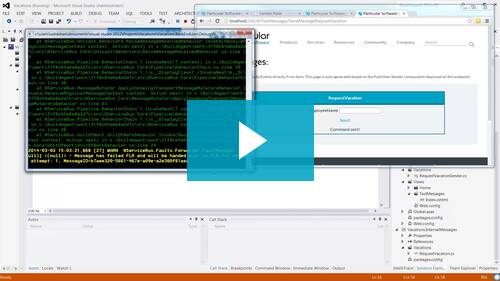
Here’s some other things you might find interesting.
Testing you can trust
I’ll bet you didn’t know the level of testing that we’re now putting into each release.
Every time we put out a new release, we test it on cloud servers configured across all permutations of transports, containers, persistence technologies, server operating systems, as well as for compatibility with previously released versions 2 years back (!). This way, when you want to have a new system subscribe to events published by a system already in production, you’ll know that it will all “just work” – no matter what.
Running all of these tests in the cloud is something that we could never afford back when we were a regular free/open-source project, but is definitely worth it. We know you count on us for your mission-critical systems and will continue doing our very best to be worthy of that trust.
The roadmap
Now that the platform is out, the next big thing you can expect is the removal of all distributed transactions.
Over the past months (and even years) we’ve been making preparations for this, making all sorts of small backwards compatible changes and enhancements so that we can fully control the inbound and outbound behavior of messages. The investments we’ve been making in automated tests is also in support of this. We want to be absolutely positive that you will get the exact same logical behavior as before without losing any of the transactional guarantees you’ve come to expect from NServiceBus.
We’ll give you updates on this and the other things we’re working on soon, as part of our larger roadmap so that you’ll know roughly what kind of big features you can expect and when. Of course, we always leave some “slack” in our iterations for working on critical patches, enhancements, and refactoring.
In any case, the main idea here is for you to be able to give us feedback and input on what’s important to you and for us to communicate back what we will be able to commit to and when.
Expressing our thanks
It’s been quite a journey this past year – the company has doubled in size and we’ve really got a great group of people here. While we’re constantly looking ahead and seeing all the wonderful things that we want to do, I wanted to take a moment and look back.
It’s been almost two years of work on ServiceMatrix (previously named NSB Studio) – the absolute biggest investment we’ve made. This past year was really the biggest push, and when taken together with all of the other tools – the production monitoring in ServicePulse that so many people have been clamoring for; the under-the-hood visibility of ServiceInsight; and the unseen glue of ServiceControl tying them all together; well, it was a very ambitious year.
I wanted to thank everyone who took part in our betas – your feedback was absolutely invaluable;
To our Community Champs who keep asking us the difficult questions and pushing us to do better;
To all of you in our community who have believed in us;
To the growing ranks of paying customers who voted with their wallets as well as their hearts;
You have my personal thanks as well as those of the entire team.
It continues to be an honor and a privilege.
Go and get it
That’s it – go to www.particular.net and click the big “download now” button and take the new platform for a spin!
I can’t wait to hear what you all think.
Posted in EDA, ESB, Messaging, MSMQ, NServiceBus, Pub/Sub, SOA | 1 Comment »
Monday, April 7th, 2014
When I was in London a couple of weeks ago teaching my SOA class, I gave an evening presentation called Loosely-Coupled Orchestration which talked about some of the challenges people face when introducing more event-driven and asynchronous patterns into their systems – for example, dealing with out-of-order message delivery.
I’m happy to say that the recording of that session is now online, courtesy of the good folks at Skills Matter, and you can now view that here.
In this presentation, you’ll also see a lot of the new capabilities that will be coming out soon with the release of our new Particular Service Platform – the suite of tools that makes NServiceBus that much more awesome. From monitoring of production issues, to debugging cross-endpoint message flows, to modeling of message-driven & service-oriented systems, it really takes distributed systems development to the next level.
Check it out!
Oh, I almost forgot, there are still some seats left for my course in New York City. Details here.
Posted in Community, EDA, Messaging, NServiceBus, Presentations, Pub/Sub, SOA | 1 Comment »
Wednesday, April 2nd, 2014
 So, I’ve been a bad presenter. So, I’ve been a bad presenter.
I’ve given my Programming in 4D talk already several times and I haven’t yet uploaded the code for it.
And seeing as I’m going to be giving it again today (at the DevWeek conference in London), I figured that I should finally get my act together and put it online.
Interestingly enough, the other conferences I’ve spoken at either didn’t record it or didn’t put the recording online. Hopefully DevWeek will do better <FingersCrossed/>.
The overall solution
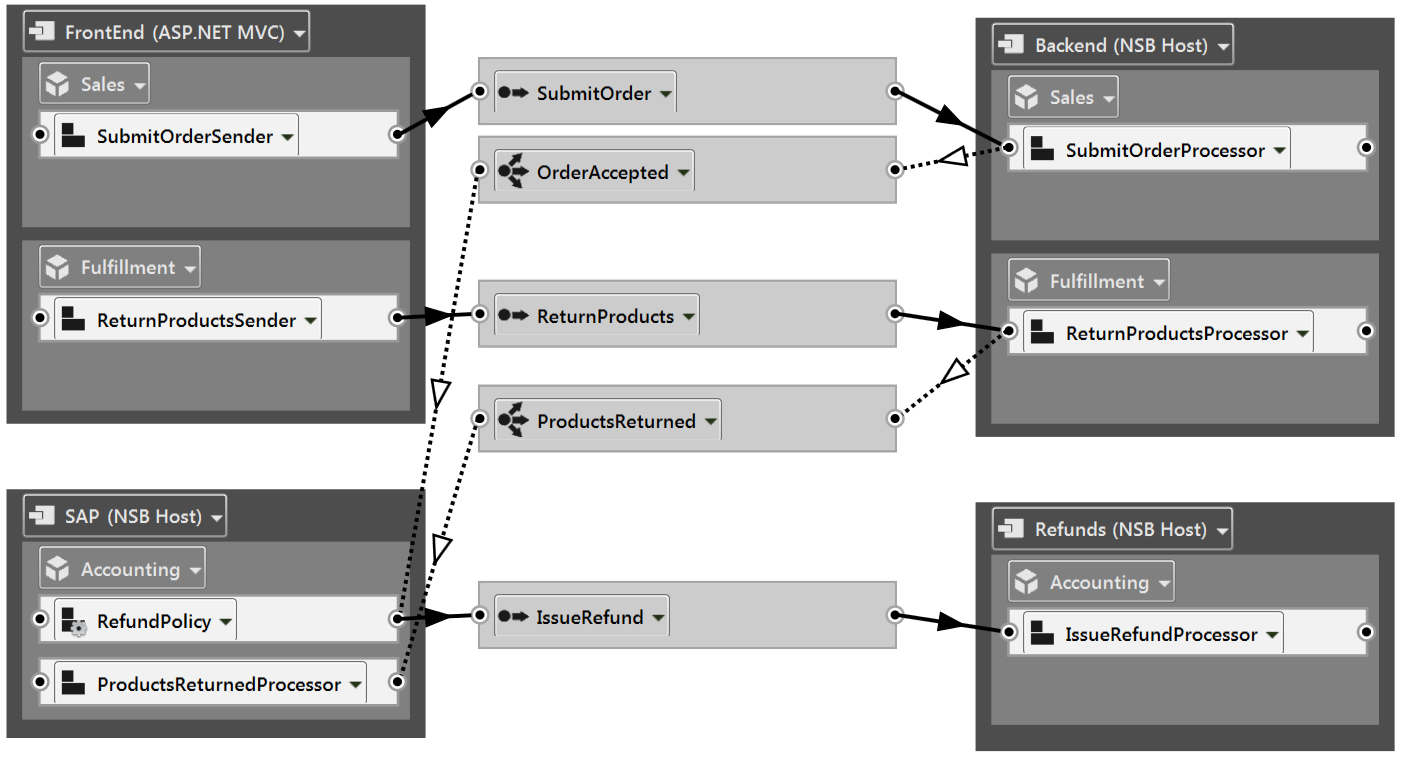
The scenario I talk about in this presentation is (again) a standard one in the world of retail: customers who want to return products that they’ve purchased and get a refund.
I’ve used our new ServiceMatrix tooling to model the solution like this (click for a larger image):
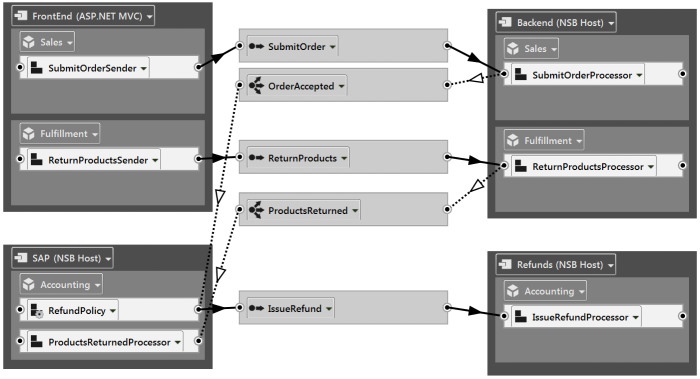
If you’d like to download the complete solution, click here.
Now, we’re going to focus on the RefundPolicy object that you can see towards the bottom left.
The Refund Policy
So, in this scenario, what we’re going to implement is a process whereby if you return your products within 30 days of the purchase, you’ll receive a 100% refund; if you return your products within 60 days you’ll receive a 50% refund, and anything longer than that and no refund for you.
Here’s the code:
public class RefundPolicy : Saga<RefundPolicySagaData>,
IAmStartedByMessages<OrderAccepted>,
IHandleMessages<ProductsReturned>,
IHandleTimeouts<Percent>,
IHandleSagaNotFound
{
public void Handle(OrderAccepted message)
{
Data.OrderId = message.OrderId;
Console.WriteLine("OrderAccepted");
Data.Percent = 100;
RequestTimeout(TimeSpan.FromDays(30), 50.Percent());
RequestTimeout(TimeSpan.FromDays(60), 0.Percent());
}
public void Handle(ProductsReturned message)
{
Console.WriteLine("ProductsReturned");
Bus.Send<IssueRefund>(m => m.Percent = Data.Percent);
MarkAsComplete();
}
public override void ConfigureHowToFindSaga()
{
ConfigureMapping<ProductsReturned>(m => m.OrderId).ToSaga(s => s.OrderId);
}
public void Timeout(Percent state)
{
Console.WriteLine("Timeout");
Data.Percent = state;
if (state == 0)
MarkAsComplete();
}
public void Handle(object message)
{
if (message is ProductsReturned)
Console.WriteLine("No refund for you");
}
}
public class RefundPolicySagaData : ContainSagaData
{
[Unique]
public int OrderId { get; set; }
public Percent Percent { get; set; }
}
And what’s so good about that?
Well, not to steal my own thunder and give you a reason not to watch the video when it comes out, the trick is in the two RequestTimeout calls that are invoked when an OrderAccepted message arrives. You see, what that does is that it takes the data that defines the behavior of the refund policy and persists that via a queue, which will play back the data to our object according to the defined schedule.
This way, if/when the business decides to change the rules (say, reducing the timeframes to 20 days and 40 days), that will only affect users who are placing new purchases. The customers who made a purchase 50 days earlier (when the rules were still 30/60) will get the correct behavior applied to them.
Next steps
Of course, nobody would want a developer to have to open this code and change it in order to make a simple change like 30/60 -> 20/40, so we could externalize the data by creating a dictionary property on the saga where the key is the TimeSpan and the value is the Percent. Then, we could pull those values from either a config file or database and inject them into the property on the saga.
Here’s how the code of the saga would change:
public class RefundPolicy : Saga<RefundPolicySagaData>,
IAmStartedByMessages<OrderAccepted>,
IHandleMessages<ProductsReturned>,
IHandleTimeouts<Percent>,
IHandleSagaNotFound
{
public Dictionary<TimeSpan, Percent> DataDefinitions { get; set; }
partial void HandleImplementation(OrderAccepted message)
{
Data.OrderId = message.OrderId;
Console.WriteLine("OrderAccepted");
Data.Percent = 100;
foreach(var kv in DataDefinitions)
RequestTimeout(kv.Key, kv.Value);
}
And the code to do the property injection would look like this:
public class RefundPolicyDataConfigurator : INeedInitialization
{
public void Init()
{
Dictionary<TimeSpan, Percent> data = null /* get from config instead */;
Configure.Instance.Configurer
.ConfigureProperty<RefundPolicy>(p => p.DataDefinitions, data);
}
}
Classes the implement INeedInitialization are invoked at process startup, and that call to ConfigureProperty instructs the container to set the DataDefinitions property of our RefundPolicy every time it is resolved (which is on every message).
In closing
We now have a solution which allows non-developers to make changes to the refund policy definitions without requiring us to deploy any new code to production. Also, any changes that are made will preserve the promises we made to our users in the past.
Of course, if you want changes to rules to impact all users immediately, this approach wouldn’t be so good.
Again, if you’d like to download the complete solution, the code is here, and if it wasn’t already obvious, this code makes use of NServiceBus quite heavily.
When the recording comes online, I’ll update this post with a link as well as do another blog post.
Hope you like it.
Posted in Business Rules, Messaging, Modeling, NServiceBus, Versioning | 7 Comments »
Friday, June 28th, 2013
As promised, the podcast is back.
Download episode 1 here and then Subscribe to the feed.
There were 16 questions submitted and a couple hundred votes for the various topics. I was able to cover the top two questions.
Do you have a question you want to ask?
Want to vote on which questions will be answered next week?
Click here
This week’s questions
Rob Eisenberg asked:
It seems that every project I walk into has the exact same architecture, regardless of what the company is building. It’s that standard 3-tier pattern: data-business-presentation. But, there are other large-scale architectural patterns available. I’d love to hear some case studies that pair business problems with the rationale for choosing an “alternative architecture.”
And since it’s not just about knowing the right approach but also being able to convince others, I included Rvonwink’s question too:
Some of us see the genuine benefits of pub/sub, EDA and SOA design. However, how do you go about persuading the cynics, time pressed and uninformed:
Our developers hate debugging pub/sub models; Others love the ‘simplicity’ of monolithic domains; Our DBA questions why messaging is required (since “the bus simply persists messages elsewhere”); Our sys admins hate deploying new applications or changing the deployment topology; Our boss is scared to tell the business there is a little extra work to start splitting apart services.
Next week
Currently the top questions for next week are:
- Composite UI, Business Components and Deployment
- How to handle predetermined technology choices
- How do you manage NULL pointer exception in general?
What would you like to hear? Let me know.
Until next week…
Posted in Architecture, Ask Udi Podcast, Databases, EDA, Messaging, NOSQL, Pub/Sub | 5 Comments »
Monday, December 31st, 2012
 Occasionally I get questions about the issue of transactional messaging – why is it so important, why does NServiceBus default to this behavior, and if we didn’t use it, what bad things could happen. I’m talking specifically about the ability to enlist a queue in a distributed transaction here. Occasionally I get questions about the issue of transactional messaging – why is it so important, why does NServiceBus default to this behavior, and if we didn’t use it, what bad things could happen. I’m talking specifically about the ability to enlist a queue in a distributed transaction here.
I think the reason for this interest is the rise in popularity of cloud platforms and queuing systems like RabbitMQ (which don’t support distributed transactions) and the difficulty of setting up distributed transactions even in on-premise.
Of course, there’s also the regular scalability hand-wringing going on even though most people wouldn’t bump up against those limits anyway.
In this post, I’ll talk about the nature of the problem, explain the pitfalls in some of the common solutions, but I’ll put off the description of how to provide consistency without distributed transactions to a future post as this one is already going to be quite long.
I’ll start with the basic fault-tolerance issues and then explain how things spiral out from there.
Starting with the basics
OK, so we have a queuing system in place that dispatches messages to our business logic which does some transactional work against a database.
Let’s say that we completed the transaction against our database but before we could acknowledge to the queue that the message was processed successfully, our machine crashed. What our machine comes up again, the queue will once again dispatch us the same message. Unless we have some logic to detect that we’ve already processed it (called “idempotence” in the REST community), we will end up processing it again.
In short, the problem is duplicates.
Attempted solutions to the duplicate problem
Most queuing systems don’t do anything about duplicates, actually giving it a proper architectural name: At-least-once message delivery, as opposed to the Once-and-only-once model that a queue that supports distributed transaction provides.
The solution often suggested is to have your logic check to see if it has already processed a message with that ID before – in essence storing the ID of each message processed for some period of time. Of course, there is some performance overhead with that, but it might be a small price to pay compared to dealing with it in the logic of every use case.
On the other hand, you’ll often have some messages (like Update commands) for which it looks like you can safely process them multiple times, in which case you might want not to pay the performance overhead there. The thing is, if your logic publishes an event in addition to the regular database work (something that is quite common) and you process the same message twice, you will probably end up publishing the event twice as well.
These duplicates are different in that here we have two distinct messages with different IDs that contain the same business data. This means that recipients of these messages will not be able to filter them out at an infrastructure level anymore.
NOTE: Deduplication abilities in queues
Although the Azure Service Bus doesn’t support distributed transactions meaning you still have the issue mentioned above, Microsoft added the ability to detect and filter out duplicates based on message contents rather than just the ID. This helps quite a bit but it’s important to understand that that doesn’t cover everything for you. Let me explain:
More complex logic
In some of your most important use cases, you may have both entity updates as well as entity creation happening together in your domain model. You might be using some kind of event model (like I wrote about here) to percolate out the information that an entity was created in order to keep your service layer decoupled from the internals of the domain model.
In the callback code from these domain events, you will likely publish out an event on the queuing system containing information like the ID of the entities created as well as other business data. And there’s the rub.
You see, without distributed transactions, you can run into some problematic scenarios:
For example, if you don’t make sure that your event publishing calls to the queuing system include the same transaction object as the one you used when retrieving the original message from the queue, then those calls could “escape” before you know if the database transaction is going to succeed. Deadlocks always happen at the lousiest times. Anyway, if you’re using database generated IDs for your entities, then those IDs will get published out in events despite the database rolling back and your subscribers will now be making decisions on wrong data – not just eventually consistent data.
In this case, processing the message again doesn’t really solve the problem – it just means that you’ll be publishing events with different IDs, so an infrastructure like Azure Service Bus couldn’t really de-duplicate them.
On the other hand, if you do use the same transaction and combine in the infrastructural message ID based de-duplication described above (as identifying duplicate calls for complex business logic is damn hard), you’ll run into another problem.
Consider what would happen if your server crashes right after finishing its database work but before it completes the transaction against the queuing system. When going to retry the message, the infrastructure filtering thing would know not to call your business logic again and that message would be quietly swallowed. Unfortunately, the event publishing calls to the queuing system from the first time the message was processed were rolled back and since your business logic isn’t called again, the event publishing won’t happen again.
Oops.
In closing
I hope I’ve been able to clarify what kind of scenarios distributed transactions solve for you and some of the difficulties in solving them yourself.
Now, to be clear, you could solve these problems by going in-depth on each of your use cases, analyzing the consistency needs and structuring the code differently to address those needs. But give this another thought, if our consistency is dependent on calling otherwise independent APIs in exactly the right order, and that a change in this order would not cause any visible functional effects, what would happen when developers with less expertise maintain this code?
The folks in the event sourcing community have their solution to this which is based on writing their business logic differently. As the adoption of this pattern is still pretty limited (probably still in the Innovator section of the Technology Adoption Curve), it’ll be interesting to see how it holds up with larger teams in the mainstream.
Oh, and in case it wasn’t clear from before, the guys in the REST community haven’t even begun addressing this problem when it comes to server-to-server integration.
We’re working on a solution for this with NServiceBus that won’t require you to change how you write business logic. We’ve got one big release to do before we can roll this in, and that’s coming soon (with all sorts of cool things like support for ActiveMQ and queues in the database). The solution we’ve found is architecturally sound but you’ll have to wait for my next post to hear about it.
Stay tuned.
Posted in Architecture, Consistency, Databases, DDD, EDA, ESB, Messaging, MSMQ, NServiceBus, Pub/Sub | 12 Comments »
Monday, December 10th, 2012
 It’s quite common for our systems to need to expose an API for external parties to call that isn’t exactly aligned with our service boundaries – at least, when you follow the “vertical services” model rather than the “layered services” approach. I’ve blogged many times about the problems with layering, so I won’t go into that now beyond to say that you really, REALLY, should avoid it. It’s quite common for our systems to need to expose an API for external parties to call that isn’t exactly aligned with our service boundaries – at least, when you follow the “vertical services” model rather than the “layered services” approach. I’ve blogged many times about the problems with layering, so I won’t go into that now beyond to say that you really, REALLY, should avoid it.
A short intro to SOA, done right
In the “vertical services” approach I espouse, you often see components from multiple services deployed to any given endpoint. While these services usually don’t need to communicate with each other at all, occasionally you’ll see them leaving “breadcrumbs” behind for each other – things like UserId or OrderId in the session. What’s especially important is that these IDs are accessible even before the entity is finalized – this enables each service to collect its own data without needing any other service to know about that data.
In an ecommerce environment, we would see one service owning money, another the product catalog (excluding prices, those would be owned by the previous service), another service owning the customers’ payment info (credit cards, etc), and yet another owning shipping addresses – all of these separate from the one that owns the shopping cart. Let’s call these Finance, Catalog, Payment, Shipping, and finally Shopping – just so that we have something to reference later.
The API
While we can do all sorts of cool browser composition with the UI in our own system, enabling each service to collect and display its own information, if we want to expose an API for clients to call, we wouldn’t want to force those clients to have to make a separate call to each service in order to make a purchase. Instead, we’d want something that looks like:
MakePurchase(Guid orderId, Dictionary cart, CreditCardInfo cc, Address shippingAddress)
In case you were wondering, the service which owns the definition of this API is different from all of the above services – it is a service that is primarily technical in nature and is responsible for things like integration and data transformations. I call this service IT/Ops.
Getting the data from the API to the services
So, we don’t want any of our business-centric services to know about anybody else’s data structures, so that leaves it to IT/Ops to pass the data to them. The thing is that we still want to do that in the most loosely-coupled way possible – with messaging being a good candidate for that.
So, what we’ll do is have IT/Ops send a message containing the data to the other services, but with a slight twist.
Here’s what the code would look like with NServiceBus:
Bus.SendLocal(new Order { Id = orderId, Cart = cart,
                          CreditCard = cc, ShippingAddress = shippingAddress });
Why the SendLocal?
So that the components from the other services can all run together with IT/Ops in the same process giving a nice tight deployment model.
UPDATE:
If you’re using a transport like RabbitMQ that is set up as a remote broker, the overhead of going back through the broker might not be worth the improved reliability you’d get by going through messaging. In that case, you might want to consider the Domain Events approach. This would give you a similar level of decoupling but then IT/Ops would need to set up an surrounding transaction, well, that is if you want all the services processing to succeed/fail as one unit. If you don’t, you’d probably be better off just sending messages from IT/Ops to endpoints that host each of the components of the other services.
End Update
Before we get to the services, let me show you the Order class – specifically, the interfaces it implements:
public class Order : ShoppingOrder, PaymentsOrder, ShippingOrder
{
    public Guid OrderId { get; set; }
    public Dictionary<Guid, int> Cart { get; set; }
    public CreditCardInfo CreditCard { get; set; }
    public Address ShippingAddress { get; set; }
}

public interface ShoppingOrder
{
    Guid OrderId { get; set; }
    Dictionary<Guid, int> Cart { get; set; }
}

public interface PaymentsOrder
{
    Guid OrderId { get; set; }
    CreditCardInfo CreditCard { get; set; }
}

public interface ShippingOrder
{
    Guid OrderId { get; set; }
    Address ShippingAddress { get; set; }
}
Each of the above interfaces represents the data that each service cares about. Therefore, each service will provide an assembly that handles that message/data and persists it to its database, like this:
public class ShoppingAPIHandler : IHandleMessages<ShoppingOrder>
{
    public void Handle(ShoppingOrder message)
    {
        //persist to shopping service db
    }
}

public class PaymentsAPIHandler : IHandleMessages<PaymentsOrder>
{
    public void Handle(PaymentsOrder message)
    {
        //persist to payment service db
    }
}

public class ShippingAPIHandler : IHandleMessages<ShippingOrder>
{
    public void Handle(ShippingOrder message)
    {
        //persist to shipping service db
    }
}
Since the Order object being sent is a polymorphic match for all of these interfaces, NServiceBus knows to invoke all of these handlers. By the way, if you care about the order of invocation, then you can control that as well (but I won’t get into that here).
Also, since all of these handler assemblies are deployed to the same endpoint, and the Order object is sent just once, this means that all the handlers will be invoked in a single transaction on a single thread – either all of them succeeding, or all failing. Since they’re all connected on the same Order Id, referential integrity can be preserved as well.
Wrapping up
When you are building a system on SOA principles, you’ll often find that you need a service like IT/Ops to handle data transformation and other broker-centric tasks. While much of SOA is based on the Bus Architectural Style – meaning primarily publish/subscribe interaction between services – that doesn’t mean that your business-centric services cannot have their components deployed in the same process.
I’d go so far as to say that if you aren’t deploying components from multiple services in process with each other at least some of the time then it’s quite likely that your service boundaries are probably incorrect.
Anyway, I hope you found this post interesting. Shout out to Slawek who gave me the idea for this post.
By the way, if you’d like to learn more about these kinds of patterns, the next batch of courses is open for registration – but the early bird prices are almost over, so you’d better hurry.
Register for Denver CO, USA, Bad Ems, Germany, Perth, Australia.
Posted in Architecture, Development, ESB, Messaging, NServiceBus, SOA, Web Services | 45 Comments »
Wednesday, May 23rd, 2012
Following on the official announcement, I wanted to talk a bit about this new release – specifically the modeling tools we’ve integrated with NServiceBus.
Drag & Drop? Code-Gen?! Run Away!!
You see, I’ve always been very opposed to draggy-droppy development environments. Also, I’ve had pretty bad experiences with code generation – usually taking the stance that if there was something repetitive that was being handled by code-gen, it would have been better to design the system in such a way that it wouldn’t require anything repetitive.
And yet, here I am, telling you that I think that the draggy-droppy code-gen that we’ve introduced with ServiceMatrix make NServiceBus that much better – not only does it shorten and flatten the learning curve for those looking at NServiceBus for the first time, but it also really improves the productivity of those already experienced with it.
I almost can’t believe I’m saying this, but it is the future.
The current state of things
That being said, it currently is still very much a v1 release – more of an accelerator for setting a new system up quickly than something integrated in the full system life-cycle.
Update:We’ve now get everything updated for VS2012 and would love your feedback. Check out ServiceMatrix.
Here are some things that are on the roadmap for the future:
- Making large solutions easier to navigate by integrating a kind of “pivoting view” that shows different dimensions of the solution and the relationships between them instead of the current single-dimensional tree view.Done
- Round-tripping – changes to code sync-ing back to the model. Renaming a message or a handler should work whether you go model-first or code-first.
- Audit visualizations – taking the results of the previous run from our audit log and making it easy to see who sent which messages to whom, rewinding, fast-forwarding, and replaying the audit log to debug that last execution
I’ll be honest with you – building this stuff is expensive. If we hadn’t gone down the path of commercializing NServiceBus, there was no way we could have gotten this far, let alone have a chance to do all the other things we’re planning.
On Licensing
We’ve made our fair share of mistakes along the way, particularly around licensing.
We’re a bunch of engineers – what did we know about sales?
But we’re learning and are working to get better at it – like introducing a new license calculator.
So, I’d like to take this opportunity to thank the NServiceBus community at large for sticking by us as we make these transitions, our paying customers for voting with their hearts and their wallets for the continued existence of NServiceBus, and the open-source committers who continue to contribute both with their time and their genius.
We couldn’t have done it without you and we really appreciate your support.
Go on then, give it a download, and let us know what you think. There is some nice “getting started” documentation that will take you, step by step, from a blank Visual Studio to a running ASP MVC integrated publish/subscribe solution.
Posted in Community, Development, Messaging, Modeling, NServiceBus | No Comments »
|
|
|
Recommendations
Bryan Wheeler, Director Platform Development at msnbc.com
“ Udi Dahan is the real deal.We brought him on site to give our development staff the 5-day “Advanced Distributed System Design” training. The course profoundly changed our understanding and approach to SOA and distributed systems. Consider some of the evidence: 1. Months later, developers still make allusions to concepts learned in the course nearly every day 2. One of our developers went home and made her husband (a developer at another company) sign up for the course at a subsequent date/venue 3. Based on what we learned, we’ve made constant improvements to our architecture that have helped us to adapt to our ever changing business domain at scale and speed If you have the opportunity to receive the training, you will make a substantial paradigm shift. If I were to do the whole thing over again, I’d start the week by playing the clip from the Matrix where Morpheus offers Neo the choice between the red and blue pills. Once you make the intellectual leap, you’ll never look at distributed systems the same way. Beyond the training, we were able to spend some time with Udi discussing issues unique to our business domain. Because Udi is a rare combination of a big picture thinker and a low level doer, he can quickly hone in on various issues and quickly make good (if not startling) recommendations to help solve tough technical issues.” November 11, 2010
 Sam Gentile, Independent WCF & SOA Expert
“Udi, one of the great minds in this area. A man I respect immensely.”
 Ian Robinson, Principal Consultant at ThoughtWorks
"Your blog and articles have been enormously useful in shaping, testing and refining my own approach to delivering on SOA initiatives over the last few years. Over and against a certain 3-layer-application-architecture-blown-out-to- distributed-proportions school of SOA, your writing, steers a far more valuable course."
 Shy Cohen, Senior Program Manager at Microsoft
“Udi is a world renowned software architect and speaker. I met Udi at a conference that we were both speaking at, and immediately recognized his keen insight and razor-sharp intellect. Our shared passion for SOA and the advancement of its practice launched a discussion that lasted into the small hours of the night. It was evident through that discussion that Udi is one of the most knowledgeable people in the SOA space. It was also clear why – Udi does not settle for mediocrity, and seeks to fully understand (or define) the logic and principles behind things. Humble yet uncompromising, Udi is a pleasure to interact with.”
 Glenn Block, Senior Program Manager - WCF at Microsoft
“I have known Udi for many years having attended his workshops and having several personal interactions including working with him when we were building our Composite Application Guidance in patterns & practices. What impresses me about Udi is his deep insight into how to address business problems through sound architecture. Backed by many years of building mission critical real world distributed systems it is no wonder that Udi is the best at what he does. When customers have deep issues with their system design, I point them Udi's way.”
 Karl Wannenmacher, Senior Lead Expert at Frequentis AG
“I have been following Udi’s blog and podcasts since 2007. I’m convinced that he is one of the most knowledgeable and experienced people in the field of SOA, EDA and large scale systems.
Udi helped Frequentis to design a major subsystem of a large mission critical system with a nationwide deployment based on NServiceBus. It was impressive to see how he took the initial architecture and turned it upside down leading to a very flexible and scalable yet simple system without knowing the details of the business domain.
I highly recommend consulting with Udi when it comes to large scale mission critical systems in any domain.”
 Simon Segal, Independent Consultant
“Udi is one of the outstanding software development minds in the world today, his vast insights into Service Oriented Architectures and Smart Clients in particular are indeed a rare commodity. Udi is also an exceptional teacher and can help lead teams to fall into the pit of success. I would recommend Udi to anyone considering some Architecural guidance and support in their next project.”
 Ohad Israeli, Chief Architect at Hewlett-Packard, Indigo Division
“When you need a man to do the job Udi is your man! No matter if you are facing near deadline deadlock or at the early stages of your development, if you have a problem Udi is the one who will probably be able to solve it, with his large experience at the industry and his widely horizons of thinking , he is always full of just in place great architectural ideas.
I am honored to have Udi as a colleague and a friend (plus having his cell phone on my speed dial).”
 Ward Bell, VP Product Development at IdeaBlade
“Everyone will tell you how smart and knowledgable Udi is ... and they are oh-so-right. Let me add that Udi is a smart LISTENER. He's always calibrating what he has to offer with your needs and your experience ... looking for the fit. He has strongly held views ... and the ability to temper them with the nuances of the situation. I trust Udi to tell me what I need to hear, even if I don't want to hear it, ... in a way that I can hear it. That's a rare skill to go along with his command and intelligence.”
Eli Brin, Program Manager at RISCO Group
“We hired Udi as a SOA specialist for a large scale project. The development is outsourced to India. SOA is a buzzword used almost for anything today. We wanted to understand what SOA really is, and what is the meaning and practice to develop a SOA based system.
We identified Udi as the one that can put some sense and order in our minds. We started with a private customized SOA training for the entire team in Israel. After that I had several focused sessions regarding our architecture and design.
I will summarize it simply (as he is the software simplist): We are very happy to have Udi in our project. It has a great benefit. We feel good and assured with the knowledge and practice he brings. He doesn’t talk over our heads. We assimilated nServicebus as the ESB of the project. I highly recommend you to bring Udi into your project.”
 Catherine Hole, Senior Project Manager at the Norwegian Health Network
“My colleagues and I have spent five interesting days with Udi - diving into the many aspects of SOA. Udi has shown impressive abilities of understanding organizational challenges, and has brought the business perspective into our way of looking at services. He has an excellent understanding of the many layers from business at the top to the technical infrstructure at the bottom. He is a great listener, and manages to simplify challenges in a way that is understandable both for developers and CEOs, and all the specialists in between.”
 Yoel Arnon, MSMQ Expert
“Udi has a unique, in depth understanding of service oriented architecture and how it should be used in the real world, combined with excellent presentation skills. I think Udi should be a premier choice for a consultant or architect of distributed systems.”
Vadim Mesonzhnik, Development Project Lead at Polycom
“When we were faced with a task of creating a high performance server for a video-tele conferencing domain we decided to opt for a stateless cluster with SQL server approach. In order to confirm our decision we invited Udi.
After carefully listening for 2 hours he said: "With your kind of high availability and performance requirements you don’t want to go with stateless architecture."
One simple sentence saved us from implementing a wrong product and finding that out after years of development. No matter whether our former decisions were confirmed or altered, it gave us great confidence to move forward relying on the experience, industry best-practices and time-proven techniques that Udi shared with us.
It was a distinct pleasure and a unique opportunity to learn from someone who is among the best at what he does.”
 Jack Van Hoof, Enterprise Integration Architect at Dutch Railways
“Udi is a respected visionary on SOA and EDA, whose opinion I most of the time (if not always) highly agree with. The nice thing about Udi is that he is able to explain architectural concepts in terms of practical code-level examples.”
 Neil Robbins, Applications Architect at Brit Insurance
“Having followed Udi's blog and other writings for a number of years I attended Udi's two day course on 'Loosely Coupled Messaging with NServiceBus' at SkillsMatter, London.
I would strongly recommend this course to anyone with an interest in how to develop IT systems which provide immediate and future fitness for purpose. An influential and innovative thought leader and practitioner in his field, Udi demonstrates and shares a phenomenally in depth knowledge that proves his position as one of the premier experts in his field globally.
The course has enhanced my knowledge and skills in ways that I am able to immediately apply to provide benefits to my employer. Additionally though I will be able to build upon what I learned in my 2 days with Udi and have no doubt that it will only enhance my future career.
I cannot recommend Udi, and his courses, highly enough.”
 Nick Malik, Enterprise Architect at Microsoft Corporation
“ You are an excellent speaker and trainer, Udi, and I've had the fortunate experience of having attended one of your presentations. I believe that you are a knowledgable and intelligent man.”
 Sean Farmar, Chief Technical Architect at Candidate Manager Ltd
“Udi has provided us with guidance in system architecture and supports our implementation of NServiceBus in our core business application.
He accompanied us in all stages of our development cycle and helped us put vision into real life distributed scalable software. He brought fresh thinking, great in depth of understanding software, and ongoing support that proved as valuable and cost effective.
Udi has the unique ability to analyze the business problem and come up with a simple and elegant solution for the code and the business alike. With Udi's attention to details, and knowledge we avoided pit falls that would cost us dearly.”
 Børge Hansen, Architect Advisor at Microsoft
“Udi delivered a 5 hour long workshop on SOA for aspiring architects in Norway. While keeping everyone awake and excited Udi gave us some great insights and really delivered on making complex software challenges simple. Truly the software simplist.”
Motty Cohen, SW Manager at KorenTec Technologies
“I know Udi very well from our mutual work at KorenTec. During the analysis and design of a complex, distributed C4I system - where the basic concepts of NServiceBus start to emerge - I gained a lot of "Udi's hours" so I can surely say that he is a professional, skilled architect with fresh ideas and unique perspective for solving complex architecture challenges. His ideas, concepts and parts of the artifacts are the basis of several state-of-the-art C4I systems that I was involved in their architecture design.”
 Aaron Jensen, VP of Engineering at Eleutian Technology
“ Awesome. Just awesome.
We’d been meaning to delve into messaging at Eleutian after multiple discussions with and blog posts from Greg Young and Udi Dahan in the past. We weren’t entirely sure where to start, how to start, what tools to use, how to use them, etc. Being able to sit in a room with Udi for an entire week while he described exactly how, why and what he does to tackle a massive enterprise system was invaluable to say the least.
We now have a much better direction and, more importantly, have the confidence we need to start introducing these powerful concepts into production at Eleutian.”
 Gad Rosenthal, Department Manager at Retalix
“A thinking person. Brought fresh and valuable ideas that helped us in architecting our product. When recommending a solution he supports it with evidence and detail so you can successfully act based on it. Udi's support "comes on all levels" - As the solution architect through to the detailed class design. Trustworthy!”
 Chris Bilson, Developer at Russell Investment Group
“I had the pleasure of attending a workshop Udi led at the Seattle ALT.NET conference in February 2009. I have been reading Udi's articles and listening to his podcasts for a long time and have always looked to him as a source of advice on software architecture. When I actually met him and talked to him I was even more impressed. Not only is Udi an extremely likable person, he's got that rare gift of being able to explain complex concepts and ideas in a way that is easy to understand. All the attendees of the workshop greatly appreciate the time he spent with us and the amazing insights into service oriented architecture he shared with us.”
 Alexey Shestialtynov, Senior .Net Developer at Candidate Manager
“I met Udi at Candidate Manager where he was brought in part-time as a consultant to help the company make its flagship product more scalable. For me, even after 30 years in software development, working with Udi was a great learning experience. I simply love his fresh ideas and architecture insights. As we all know it is not enough to be armed with best tools and technologies to be successful in software - there is still human factor involved. When, as it happens, the project got in trouble, management asked Udi to step into a leadership role and bring it back on track. This he did in the span of a month. I can only wish that things had been done this way from the very beginning. I look forward to working with Udi again in the future.”
 Christopher Bennage, President at Blue Spire Consulting, Inc.
“My company was hired to be the primary development team for a large scale and highly distributed application. Since these are not necessarily everyday requirements, we wanted to bring in some additional expertise. We chose Udi because of his blogging, podcasting, and speaking. We asked him to to review our architectural strategy as well as the overall viability of project.
I was very impressed, as Udi demonstrated a broad understanding of the sorts of problems we would face. His advice was honest and unbiased and very pragmatic. Whenever I questioned him on particular points, he was able to backup his opinion with real life examples.
I was also impressed with his clarity and precision. He was very careful to untangle the meaning of words that might be overloaded or otherwise confusing. While Udi's hourly rate may not be the cheapest, the ROI is undoubtedly a deal.
I would highly recommend consulting with Udi.”
Robert Lewkovich, Product / Development Manager at Eggs Overnight
“Udi's advice and consulting were a huge time saver for the project I'm responsible for. The $ spent were well worth it and provided me with a more complete understanding of nServiceBus and most importantly in helping make the correct architectural decisions earlier thereby reducing later, and more expensive, rework.”
 Ray Houston, Director of Development at TOPAZ Technologies
“Udi's SOA class made me smart - it was awesome.
The class was very well put together. The materials were clear and concise and Udi did a fantastic job presenting it. It was a good mixture of lecture, coding, and question and answer. I fully expected that I would be taking notes like crazy, but it was so well laid out that the only thing I wrote down the entire course was what I wanted for lunch. Udi provided us with all the lecture materials and everyone has access to all of the samples which are in the nServiceBus trunk.
Now I know why Udi is the "Software Simplist." I was amazed to find that all the code and solutions were indeed very simple. The patterns that Udi presented keep things simple by isolating complexity so that it doesn't creep into your day to day code. The domain code looks the same if it's running in a single process or if it's running in 100 processes.”
 Ian Cooper, Team Lead at Beazley
“Udi is one of the leaders in the .Net development community, one of the truly smart guys who do not just get best architectural practice well enough to educate others but drives innovation. Udi consistently challenges my thinking in ways that make me better at what I do.”
Liron Levy, Team Leader at Rafael
“I've met Udi when I worked as a team leader in Rafael. One of the most senior managers there knew Udi because he was doing superb architecture job in another Rafael project and he recommended bringing him on board to help the project I was leading. Udi brought with him fresh solutions and invaluable deep architecture insights. He is an authority on SOA (service oriented architecture) and this was a tremendous help in our project. On the personal level - Udi is a great communicator and can persuade even the most difficult audiences (I was part of such an audience myself..) by bringing sound explanations that draw on his extensive knowledge in the software business. Working with Udi was a great learning experience for me, and I'll be happy to work with him again in the future.”
 Adam Dymitruk, Director of IT at Apara Systems
“I met Udi for the first time at DevTeach in Montreal back in early 2007. While Udi is usually involved in SOA subjects, his knowledge spans all of a software development company's concerns. I would not hesitate to recommend Udi for any company that needs excellent leadership, mentoring, problem solving, application of patterns, implementation of methodologies and straight out solution development. There are very few people in the world that are as dedicated to their craft as Udi is to his. At ALT.NET Seattle, Udi explained many core ideas about SOA. The team that I brought with me found his workshop and other talks the highlight of the event and provided the most value to us and our organization. I am thrilled to have the opportunity to recommend him.”
 Eytan Michaeli, CTO Korentec
“Udi was responsible for a major project in the company, and as a chief architect designed a complex multi server C4I system with many innovations and excellent performance.”
 Carl Kenne, .Net Consultant at Dotway AB
“Udi's session "DDD in Enterprise apps" was truly an eye opener. Udi has a great ability to explain complex enterprise designs in a very comprehensive and inspiring way. I've seen several sessions on both DDD and SOA in the past, but Udi puts it in a completly new perspective and makes us understand what it's all really about. If you ever have a chance to see any of Udi's sessions in the future, take it!”
Avi Nehama, R&D Project Manager at Retalix
“Not only that Udi is a briliant software architecture consultant, he also has remarkable abilities to present complex ideas in a simple and concise manner, and...
always with a smile. Udi is indeed a top-league professional!”
 Ben Scheirman, Lead Developer at CenterPoint Energy
“Udi is one of those rare people who not only deeply understands SOA and domain driven design, but also eloquently conveys that in an easy to grasp way. He is patient, polite, and easy to talk to. I'm extremely glad I came to his workshop on SOA.”
 Scott C. Reynolds, Director of Software Engineering at CBLPath
“Udi is consistently advancing the state of thought in software architecture, service orientation, and domain modeling.
His mastery of the technologies and techniques is second to none, but he pairs that with a singular ability to listen and communicate effectively with all parties, technical and non, to help people arrive at context-appropriate solutions.
Every time I have worked with Udi, or attended a talk of his, or just had a conversation with him I have come away from it enriched with new understanding about the ideas discussed.”
Evgeny-Hen Osipow, Head of R&D at PCLine
“Udi has helped PCLine on projects by implementing architectural blueprints demonstrating the value of simple design and code.”
 Rhys Campbell, Owner at Artemis West
“For many years I have been following the works of Udi. His explanation of often complex design and architectural concepts are so cleanly broken down that even the most junior of architects can begin to understand these concepts. These concepts however tend to typify the "real world" problems we face daily so even the most experienced software expert will find himself in an "Aha!" moment when following Udi teachings.
It was a pleasure to finally meet Udi in Seattle Alt.Net OpenSpaces 2008, where I was pleasantly surprised at how down-to-earth and approachable he was. His depth and breadth of software knowledge also became apparent when discussion with his peers quickly dove deep in to the problems we current face. If given the opportunity to work with or recommend Udi I would quickly take that chance. When I think .Net Architecture, I think Udi.”
 Sverre Hundeide, Senior Consultant at Objectware
“Udi had been hired to present the third LEAP master class in Oslo. He is an well known international expert on enterprise software architecture and design, and is the author of the open source messaging framework nServiceBus.
The entire class was based on discussion and interaction with the audience, and the only Power Point slide used was the one showing the agenda.
He started out with sketching a naive traditional n-tier application (big ball of mud), and based on suggestions from the audience we explored different solutions which might improve the solution. Whatever suggestions we threw at him, he always had a thoroughly considered answer describing pros and cons with the suggested solution. He obviously has a lot of experience with real world enterprise SOA applications.”
 Raphaël Wouters, Owner/Managing Partner at Medinternals
“I attended Udi's excellent course 'Advanced Distributed System Design with SOA and DDD' at Skillsmatter. Few people can truly claim such a high skill and expertise level, present it using a pragmatic, concrete no-nonsense approach and still stay reachable.”
 Nimrod Peleg, Lab Engineer at Technion IIT
“One of the best programmers and software engineer I've ever met, creative, knows how to design and implemet, very collaborative and finally - the applications he designed implemeted work for many years without any problems!”
Jose Manuel Beas
“When I attended Udi's SOA Workshop, then it suddenly changed my view of what Service Oriented Architectures were all about. Udi explained complex concepts very clearly and created a very productive discussion environment where all the attendees could learn a lot. I strongly recommend hiring Udi.”
 Daniel Jin, Senior Lead Developer at PJM Interconnection
“Udi is one of the top SOA guru in the .NET space. He is always eager to help others by sharing his knowledge and experiences. His blog articles often offer deep insights and is a invaluable resource. I highly recommend him.”
 Pasi Taive, Chief Architect at Tieto
“I attended both of Udi's "UI Composition Key to SOA Success" and "DDD in Enterprise Apps" sessions and they were exceptionally good. I will definitely participate in his sessions again. Udi is a great presenter and has the ability to explain complex issues in a manner that everyone understands.”
Eran Sagi, Software Architect at HP
“So far, I heard about Service Oriented architecture all over.
Everyone mentions it – the big buzz word.
But, when I actually asked someone for what does it really mean, no one managed to give me a complete satisfied answer.
Finally in his excellent course “Advanced Distributed Systems”, I got the answers I was looking for.
Udi went over the different motivations (principles) of Services Oriented, explained them well one by one, and showed how each one could be technically addressed using NService bus.
In his course, Udi also explain the way of thinking when coming to design a Service Oriented system.
What are the questions you need to ask yourself in order to shape your system, place the logic in the right places for best Service Oriented system.
I would recommend this course for any architect or developer who deals with distributed system, but not only.
In my work we do not have a real distributed system, but one PC which host both the UI application and the different services inside, all communicating via WCF.
I found that many of the architecture principles and motivations of SOA apply for our system as well. Enough that you have SW partitioned into components and most of the principles becomes relevant to you as well.
Bottom line – an excellent course recommended to any SW Architect, or any developer dealing with distributed system.”
Consult with Udi
Guest Authored Books
|